Codex APP 正常使用环节需要科学上网环境,需注意
AveMujicaAPI 注册
- 通过我个人的邀请链接 https://api.avemujica.moe/sign-up?aff=3X69 注册 API,仅作统计使用,无实际收益
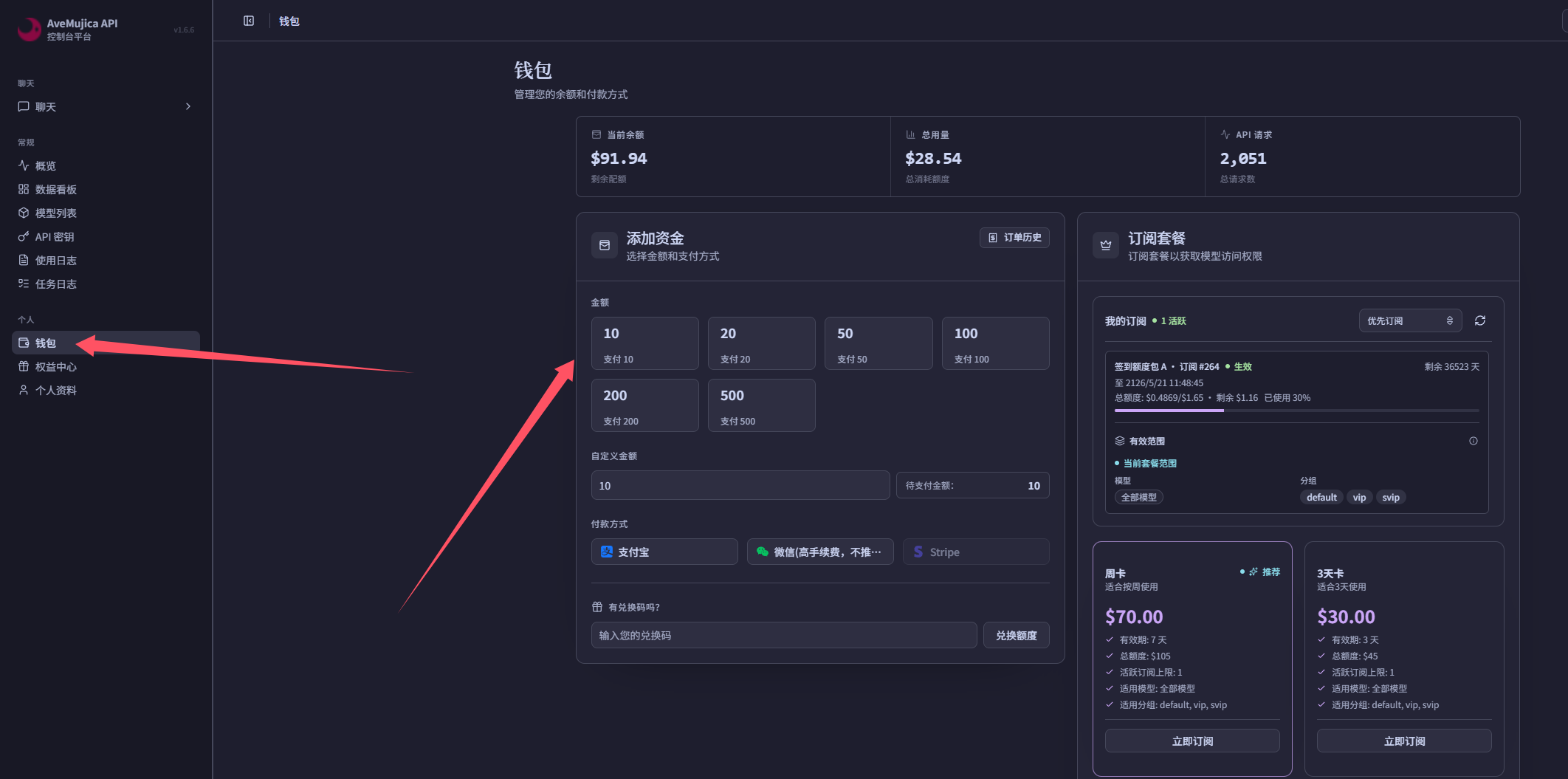
- 通过控制台平台-个人-钱包-进行氪金

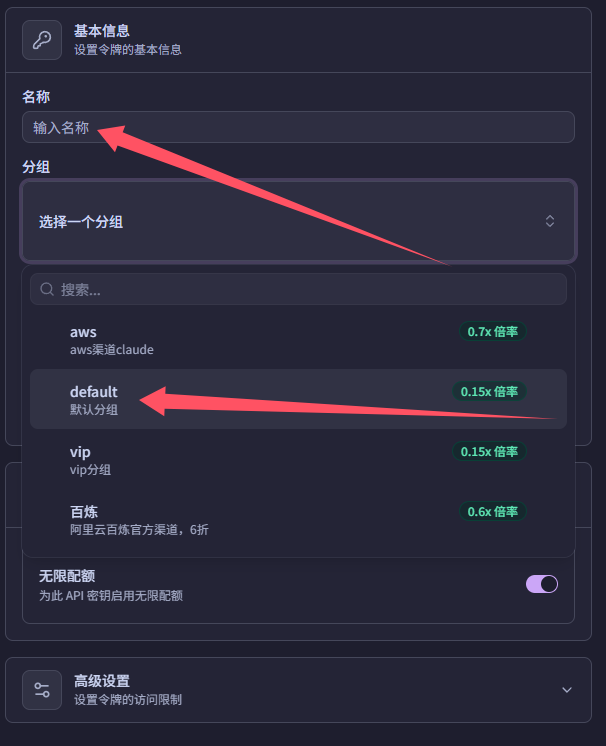
- 在 API 密钥条目中,点击右上角的创建 API 密钥,键入任意名称,分组选为 default,并将 API key 保存下来。注意不要泄露自己的 key,防止其他人盗用。
Codex 安装与配置
1. 安装 Node.js
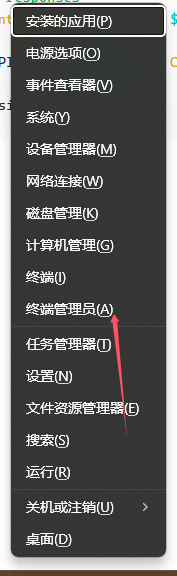
Codex CLI 需要通过 npm 安装,所以 Windows 环境下建议先安装 Node.js LTS。以管理员身份打开 PowerShell 后运行:
winget install --id OpenJS.NodeJS.LTS --exact如果上步骤出现问题,提示无权限使用或类似命令,请在powershell中键入以下命令,并选择A[全是]并重启powershell
Set-ExecutionPolicy RemoteSigned安装完成后,关闭当前 PowerShell 窗口并重新打开,再检查 Node.js 和 npm 是否可用:
node --version
npm --version
如果提示找不到 winget,可以直接从 Node.js 官网 下载 LTS 安装包,安装后同样需要重新打开 PowerShell。
2. 配置 Codex CLI 接入 AveMujicaAPI
复制下面的脚本到 PowerShell 中运行。脚本会安装 Codex CLI,备份已有的 .codex\config.toml 和 .codex\auth.json,再写入 AveMujicaAPI provider 配置。运行过程中需要输入前面保存的 API key。
$ErrorActionPreference = "Stop"

if (-not (Get-Command -Name npm -ErrorAction SilentlyContinue)) {
    throw "未检测到 npm。请先安装 Node.js LTS,并重新打开 PowerShell 后再运行本脚本。"
}

$SecureKey = Read-Host -Prompt "AveMujicaAPI API Key" -AsSecureString
$Bstr = [Runtime.InteropServices.Marshal]::SecureStringToBSTR($SecureKey)
try {
    $ApiKey = [Runtime.InteropServices.Marshal]::PtrToStringBSTR($Bstr)
}
finally {
    [Runtime.InteropServices.Marshal]::ZeroFreeBSTR($Bstr)
}

$Model = Read-Host -Prompt "Model ID [gpt-5.6-sol]"
if ([string]::IsNullOrWhiteSpace($Model)) {
    $Model = "gpt-5.6-sol"
}

if ([string]::IsNullOrWhiteSpace($ApiKey)) {
    throw "API Key is required."
}

npm install --global @openai/codex

$CodexDir = Join-Path -Path $env:USERPROFILE -ChildPath ".codex"
New-Item -Path $CodexDir -ItemType Directory -Force | Out-Null

$Stamp = Get-Date -Format "yyyyMMddHHmmss"
$ConfigPath = Join-Path -Path $CodexDir -ChildPath "config.toml"
$AuthPath = Join-Path -Path $CodexDir -ChildPath "auth.json"

if (Test-Path -LiteralPath $ConfigPath) {
    Copy-Item -LiteralPath $ConfigPath -Destination "$ConfigPath.bak.$Stamp"
}
if (Test-Path -LiteralPath $AuthPath) {
    Copy-Item -LiteralPath $AuthPath -Destination "$AuthPath.bak.$Stamp"
}

$ConfigLines = @(
    'model_provider = "avemujicaapi"'
    "model = `"$Model`""
    'model_reasoning_effort = "max"'
    'disable_response_storage = true'
    ''
    '[model_providers.avemujicaapi]'
    'name = "AveMujicaAPI"'
    'base_url = "https://api.avemujica.moe/v1"'
    'requires_openai_auth = true'
    'stream_idle_timeout_ms = 600000'
    'wire_api = "responses"'
)

$ConfigLines | Set-Content -LiteralPath $ConfigPath -Encoding UTF8

@{
    OPENAI_API_KEY = $ApiKey
} | ConvertTo-Json | Set-Content -LiteralPath $AuthPath -Encoding UTF8

codex --version
3. 安装 Codex App
安装 Codex App:下载链接。安装后,通过前面保存的 API key 登录即可开始正常使用。
也可以参考 AveMujicaAPI 站内文档:Codex 配置参考。